We've recently moved the Films Archive up into AWS S3 to provide the best availability and remove its hosting out from our On-Premises infrastructure. Here you will find the basic instructions for accessing that file storage location.
The files are not publicly available, so that means you cannot view them via their S3 url. You must first download the file or folder and view the contents from the downloaded copy.
AWS uses our Microsoft SSO settings for authentication, so if your browser already has an active Microsoft authenticated session you wont need to enter in any of your credentials.
STEP 1
- Enter the following URL into your web browser of choice
- Complete the Microsoft login process if asked, otherwise continue to STEP 2
STEP 2
- Click the drop down option labeled as "partnercomm"

STEP 3
- Choose the option labeled "films_archive"

- This will open up a new window completing AWS account authentication and delivering you to the AWS console page.
- At this point you can search for or click the S3 option on that AWS console page, or you can use this direct link to take you to the "pcomm-archive" S3 bucket containing the Films Archive.
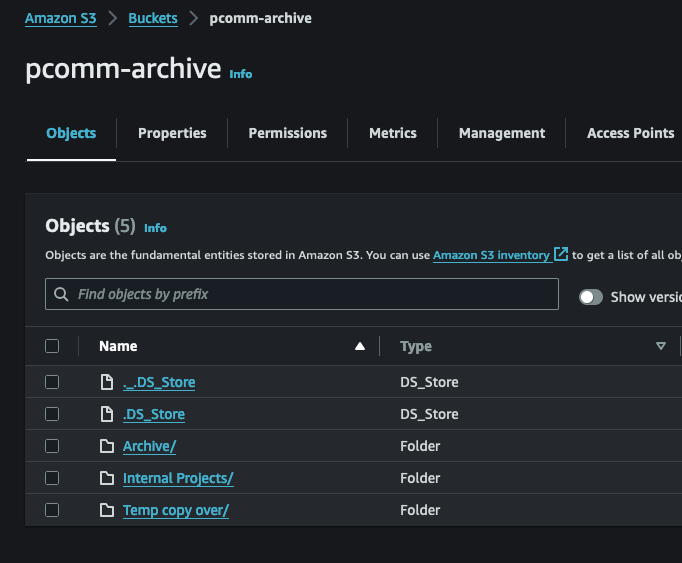
Your account will only have permissions to manage the "pcomm-archive" S3 bucket and its contents. No other AWS services will be available for you to manage (though you would be able to see our entire S3 bucket list if you went to that menu).
A brief version of this process has been added to the 1Password Video vault labeled AWS Films Access. If you have questions or concerns please submit your questions as a ticket to our HelpDesk.
Was this article helpful?
That’s Great!
Thank you for your feedback
Sorry! We couldn't be helpful
Thank you for your feedback
Feedback sent
We appreciate your effort and will try to fix the article